
- Menu
- Desks
- Seating
- Tables
- Customer Service
- 1.888.719.4960
They both go up, they both go down — but there are real differences in how confidently and smoothly they do it. Here's what you need to know before you buy.
Quick Verdict
For lighter single-monitor setups on a tighter budget, a single motor standing desk gets the job done. For wider desktops, dual-monitor rigs, or commercial office use where the desk is getting adjusted multiple times a day, go dual motor — the stability, capacity, and long-term durability are worth it. When in doubt, spec up. You won't regret the headroom.
| Feature / Factor | Single Motor Standing Desk | Dual Motor Standing Desk |
|---|---|---|
| Typical Width | Commonly 48"–60" with lighter-duty frames | Usually 48"–72" with stronger frame options |
| Approx. Weight | Frames and tops often total 80–140 lbs | Often 90–180 lbs |
| Best For | Single-monitor or lighter-duty users looking for affordable electric adjustability | Heavier tops, dual monitors, and users who want smoother, more confident daily adjustment |
| Main Advantage | Brings electric lift into a lower budget range | Better lift stability, speed, and capacity on broader workstation setups |
| Main Trade-Off | Lower weight capacity; less lifting confidence under heavier setups | Costs more than single motor options |
| Typical Lift Capacity | 150–250 lbs depending on model | 275–350+ lbs depending on model |
| Stability Under Load | Good for light-to-medium loads; can sway under heavier setups | Better balanced lift; less wobble with heavy or wide tops |
| Accessory Compatibility | Best with lighter tops and simpler monitor arrangements | Better for monitor arms, wide tops, and heavier daily loads |
| Long-Term Durability | Good when the user profile is light and the budget is firm | Strong for serious standing-desk use; fewer replacement cycles |
| Office Deployment | Workable for home offices with lighter setups | Preferred for commercial offices with all-day use |
The motor count isn't just a spec line — it's a direct indicator of how the desk handles real daily load. A single motor standing desk drives one central actuator that raises and lowers both legs through a synchronized mechanism. That works well when the top is light and the setup is simple, but it has a ceiling. Under heavier loads or on wider tops, you'll start to notice the single-drive system working harder than it should — a bit of lag, a bit of sway, less confidence in the lift.
A dual motor desk puts a dedicated drive at each leg. The result is a more balanced, more powerful lift that handles weight more evenly and provides noticeably better stability at the top of the height range — which is exactly where wobble matters most, because you're typing and working at standing height. For offices making a real commitment to sit-stand habits, that stability is the difference between a desk that's a pleasure to use and one that you gradually stop adjusting because the experience isn't quite right.
The single motor standing desk is a legitimate, capable option when your setup stays light. One monitor, a laptop or tower, keyboard and mouse — if that's your workstation, you're well within what a good single motor desk handles. It's also the right pick for budget-conscious home offices where the desk isn't getting adjusted all day long and the lower upfront cost matters. Don't let anyone convince you that single motor means low quality — the right single motor desk for a simple setup will perform exactly as you need it to for years.
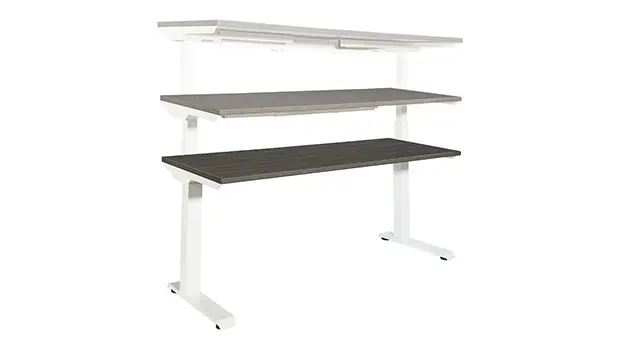
Electric Height Adjustable Standing Desk 60in W x 30in D by Office Star
View & OrderThe dual motor desk is the right call any time you're loading the surface with more than one monitor, using a monitor arm, running a wide top over 60 inches, or putting this desk in a commercial office where it'll be adjusted multiple times per day by multiple users. It's also the better spec for taller users — at maximum height, a dual motor frame holds position more securely, which matters when you're not hovering at the minimum adjustment. If you're outfitting an office and want the desks to still feel solid and perform well three or four years from now, dual motor is the investment that pays for itself by not needing to be replaced early.
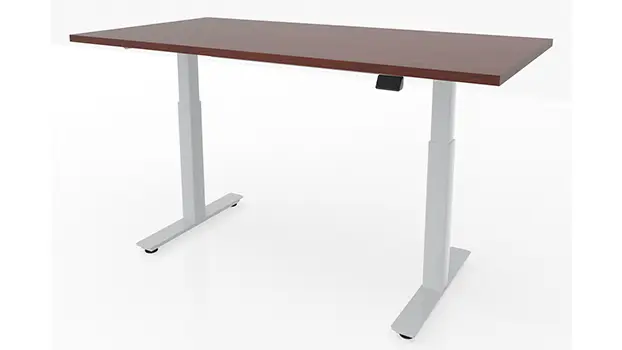
Height Adjustable Desk 48in W x 24in D by Office Star
View & OrderDual motor desks cost more upfront — that's true. But the cost conversation gets more interesting when you factor in how often a single motor desk might need to be replaced or serviced if it's being pushed beyond its ideal load range day after day. A desk that wobbles at standing height gets used less. A desk that gets used less provides fewer of the ergonomic benefits you bought it for in the first place. Think about the full life of the purchase, not just the line item today. Free shipping at FindOfficeFurniture.com means what you see is what you pay, and our team is happy to help you find the right model at the right investment level for your office.
Both single and dual motor standing desks require some assembly — you'll be attaching the top to the frame, connecting the control panel, and routing your power cable. Dual motor desks have slightly more components but the process is still straightforward. The most important setup step with any electric standing desk is making sure the legs are fully leveled before you start using it — an uneven frame puts stress on the motors over time regardless of how many there are. Leave at least 30 minutes for setup and take the time to run through the full height range a couple of times after assembly to confirm the movement is smooth and even.
For a focused single-screen home office or a budget-conscious setup that stays light, a single motor standing desk is a great fit. For any setup that involves multiple monitors, a wider surface, heavy daily use, or commercial deployment, dual motor is the smarter buy. The stability and capacity pay off every day you use it. Shop height-adjustable desks at FindOfficeFurniture.com or call us — we'll help you find the right frame and top combination for how you actually work.
Shop Standing Desks at FindOfficeFurniture.comA single motor uses one drive unit to raise and lower the frame. It works well for lighter setups but can feel less smooth under heavier or wider surfaces. A dual motor desk puts a drive unit at each leg for a more balanced, more stable lift. If your desk is loaded up with monitors and accessories, dual motor is the better choice. For a streamlined single-screen setup, single motor handles it cleanly.
Single motor desks typically support 150 to 250 lbs of desktop load. Dual motor desks generally handle 275 to 350 lbs or more. Always check the specific model's weight capacity — especially if you're using a wide top or multiple accessories. When in doubt, go dual motor for that extra capacity headroom.
Usually yes, though the speed difference is modest. The bigger benefit in daily use is smoothness — dual motor desks move more evenly because both legs lift in sync, which reduces wobble during the transition. For users who switch between sitting and standing several times a day, that smoothness makes a real difference in how much you actually use the feature.
Yes, for a light single-monitor setup. Where single motor starts to show limits is with wider tops or heavier loads. For a more substantial home workstation with multiple screens or a heavy desktop, it's worth stepping up to dual motor. Quality options are available at FindOfficeFurniture.com with free shipping.
For open-plan office deployments, dual motor is the smarter long-term investment. Employees use these desks all day, every day, and dual motor systems hold up better to constant daily adjustments. Buying single motor to save per-unit costs can mean earlier replacement cycles. If you want the furniture to perform for years, spec dual motor.